Moderation Guidelines
If you skip all else, please at least read the General Moderation Procedures and your Specific Moderation Procedures.
The Server Rules
(See also #server-rules)
Just a reminder for reference purposes when taking action.
First and foremost, be kind and respectful to all members of this server and its partners. KQM is an English-speaking community so we ask that you try to use English the majority of the time unless the actual topic relates to a foreign language.
Please be kind and respectful to all members of this server and its partners. Harassment, personal attacks, or insults of any kind will not be tolerated. This extends not only to your fellow members but also to content creators.
Controversial topics (religion, politics, etc.) are not allowed in chat, usernames, PFPs, or user banners. Spamming is not tolerated.
KQM is an English-speaking community so we ask that you try to use English the majority of the time unless the actual topic relates to a foreign language.
All NSFW should be kept inside the NSFW section ( NSFW discussion, implication, and instigation are all banned in channels that are not under the NSFW section). Do not access the NSFW section if you are not 18 and above. NSFW in profiles is not allowed.
Sexism, Racism, Lolicon, Pedophilia, Xenophobia, Gore, and other graphic content are prohibited.
Commercial promotion and solicitation (for in-game or real money) and advertising of non-partnered servers are strictly prohibited. Any Genshin account trading or selling is forbidden.
We will also issue punishment if we deem there has been serious rule-breaking in our partnered servers.
Theorycrafting of any un-released content (pre-TC) is not permitted. For more details see the rules in our theorycrafting section.
Our moderators have the final say in regard to these rules. Please listen to our moderators if they ask you to drop a topic. Ignoring a moderator's request will result in potential punishment as well.
Evasion: Creating alt accounts to circumvent reprimands such as warns, mute or bans are not allowed. Any alt accounts found will be subject to the same reprimands as the main account.
Staff Moderators
Who moderates what?
- Genshin Impact
- Honkai: Star Rail
Doug > Admin (including Head Millelith) > Pillar Heads for their specific Category > Millelith > Pillar Mods > Pillar Staff
- For the purposes of cleanliness and conflict of differing opinions, it is ideal to just go with the initial decision made.
- If you are unsure about what to do, ping higher up in the chain of command to make the final call. Do NOT make any decision if you are feeling unsure. It is always better to ask a higher up than to make a haphazard decision.
- As a last resort, if unclear whether an action was too strict or too lenient it is okay to upgrade or downgrade the action if a new determination is found by higher up in the chain of command. Just do not adjust actions more than once.
- Any appeals on warns/mutes/bans are to be determined primarily by the Head Millelith with consulting from Doug, the Admins and Millelith.
Admin (Liyue Qixing)
- Expected to moderate when called upon. Particularly for serious matters alongside the Head Millelith.
- If there are any disagreements about a decision made between Admins, the final call will be made by the Head Millelith or Doug.
- Any action/s taken should be logged in
#mod-logs
Millelith
- Expected to moderate all areas of the server. This includes carrying out all measures of actions as necessary. Expected to follow General Moderation Procedures and also specific Millelith Moderation Procedures which are outlined here.
- Reports directly to the Head Millelith and any other Admins.
- Should regularly check
#millelith-headquartersfor any updates or discussions. - Should periodically check over any of the other categories' staff logs to update on infractions.
- Any action/s taken should be logged in
#mod-logs
Guhua Guide
- Expected to lightly moderate the Help Category of the server. This includes carrying out warnings and/or mutes as necessary following General Moderation Procedures.
- Moderation can be offhanded to Millelith or Admins via !report or by pinging a Millelith as necessary.
- If someone continuously provides bad advice/help to others and has been warned multiple times, please contact Squire/Jae for them to be exiled.
- Any action/s taken should be logged in
#guhua-staff-logs
Wangsheng Theorycrafting
- Expected to lightly moderate the Theorycrafting Category of the server. This includes carrying out notes and/or warnings as necessary, following General Moderation Procedures.
- Moderation can be offhanded to Millelith or Admins via !report or by pinging a Millelith as necessary.
- Carrying out k!wangshengcoffin on any users who have breached serious theorycrafting rules and as a result lost access to the Theorycrafting Category.
- This should be logged in the Coffin Procedures document with evidence.
- Any actions taken should be logged in
#tc-staff-logs
Ying’er’s Lewds
- Expected to lightly moderate the NSFW Category of the server. This includes carrying out warnings and/or mutes as necessary following General Moderation Procedures.
- Moderation can be offhanded to
@thoxic, Millelith or Admins via ping or!report. - Any action/s taken should be logged in
#nsfw-staff-logs
Wanwen Lore
- Expected to lightly moderate the Lore Category of the server. This includes carrying out warnings and/or mutes as necessary following General Moderation Procedures.
- Moderation can be offhanded to Millelith or Admins via
!reportor by pinging a Millelith as necessary. - Any actions taken should be logged in
#lore-staff-logs
The chain of command for the final say in moderation decisions is as follows:
Doug > Admin (including Head Cloud Knight) > Pillar Heads for their specific Category > Cloud Knight > Pillar Mods > Pillar Staff
- For the purposes of cleanliness and conflict of differing opinions, it is ideal to just go with the initial decision made.
- If you are unsure about what to do, ping higher up in the chain of command to make the final call. Do NOT make any decision if you are feeling unsure. It is always better to ask a higher up than to make a haphazard decision.
- As a last resort, if unclear whether an action was too strict or too lenient it is okay to upgrade or downgrade the action if a new determination is found by higher up in the chain of command. Just do not adjust actions more than once.
- Any appeals on warns/mutes/bans are to be determined primarily by the Head Millelith with consulting from Doug, the Admins and Millelith.
Admin (Aeon)
- Expected to moderate when called upon. Particularly for serious matters alongside the Head Millelith.
- If there are any disagreements about a decision made between Admins, the final call will be made by the Head Millelith or Doug.
- Any action/s taken should be logged in
#mod-logs
Cloud Knight
- Expected to moderate all areas of the server. This includes carrying out all measures of actions as necessary. Expected to follow General Moderation Procedures and also specific Cloud Knight Moderation Procedures which are outlined here.
- Reports directly to the Head Cloud Knight and any other Admins.
- Should regularly check
#mod-talkfor any updates or discussions. - Should periodically check over any of the other categories' staff logs to update on infractions.
- Any action/s taken should be logged in
#mod-logs
Types of Infractions
What does KQM consider an infraction?
Common/Minor Infractions
As a starting point: All FIRST instances of offending are considered minor infractions unless they categorize as Major or Extreme infractions.
- A formal warning should never be handed out before a verbal warning is given unless it is categorized as a Major or Extreme infraction.
Examples
- Discussion of NSFW material outside of the NSFW category
- Harassment or aggressive behavior targeting other members of the server
- Discussion of account sales or transfers
- Extremely inappropriate usernames (request the user change their nickname and warn or simply use mod powers to change their username and DM them to change it to something more appropriate)
Response
The standard procedure for common infractions is to give a verbal warning in the text channel if the user has no history of infractions or their last history was receiving a formal warning. Formal warns should only be given on the next instance after the verbal warning has been given.
Major Infractions
These are more serious cases where a user has engaged in behavior that warrants immediate temporary removal from the community (warn & mute-the mute is done automatically when a user receives a formal warning).
Examples
- Direct attacks or threats of violence against other users
- Linking to explicit NSFW material outside of the NSFW category
- Uploading/linking to bigoted material
- Use of bigoted language
- Repeated insulting or threats to staff
- Direct advertising for the purposes of sales
Response
Mutes should be determined on a discretionary basis. It is important not to abuse the duration of a mute.
- Mutes should also err on the side of caution. Do not mute people for days or weeks on end. If for some reason you feel that this is warranted, ping
@synityto discuss the situation.
You are not to issue mutes longer than 1 day. Anything warranting longer durations should be directed to the Pillar Heads.
Extreme Infractions
This is the most serious form of infraction that is reserved for the most repugnant content that is often illegal or against Discord ToS.
Examples
- Intentionally uploading/linking to clearly underage (ex: loli, obvious child) NSFW material
- NSFL material
- Uploading explicit NSFW material outside of the NSFW category
- Blackmail, scamming, linking to any harmful material
- Discussion of actual terrorism
- Explicit audio/harassment on voice channels
- Any form of child endangerment
- Doxxing - exposing a user's real-life details without consent
- Account info phishing
- Obvious bot/botting
- Any content or discussion that breaches Discord TOS or is illegal
Response
If this is sighted without @synity present: mute the user, delete their messages, and pass on the information in #millelith-headquarters or #mod-talk to @synity for banning.
General Moderation Procedures
What action should I take?
Exercise leniency. Provide a reason and the rule(s) broken. Screenshot evidence. Set notes for verbals/warns. As a starting point, all incidents should be given a verbal warning.
Verbal Warnings → Minor infractions
- This is the starting point. See below for a definition.
- Do not skip/bypass a verbal warning right away.
- If they do not listen to the verbal warning, proceed with a formal warning.
- Use a 2nd formal warning if they do not listen to the 1st.
- This will auto-mute for 30 minutes.
Verbal warnings should always be given as our goal is always to be lenient and not jump to formal warnings.
Formal Warnings → Repeated Minor Infractions
From the 2nd warning onwards, all warns will auto-mute for 30 mins)
- Formal warnings are to be given only after the user has received a verbal warning.
- If they come back after their mute and continue with the same minor infraction, then carry out a mute (equivalent to a major infraction), as it is now considered a repeated minor infraction.
- Continued repeating instances of minor infractions should be met with the same pattern of verbal→formal warnings as long as the infractions do not become major or extreme.
The minimum standards for the following instances should be followed:
- For the 4th formal warning, the user should be notified that their next warning will result in a ban from KQM
- 5th instance, the user should be banned (passed to the Millelith for the final call)
Mutes → Major Infractions
- Mutes are discretionary but should not be for long durations. Usually, an hour or a few at most is enough.
- Anything more should be considered very carefully and should only be done when absolutely necessary.
- You must not carry out mutes that are longer than 1 day. This should be escalated to higher in the chain of command.
Bans → Repeated Major Infractions or Extreme infractions
- Non-Admins should mute users engaging in ban-worthy behavior and then report to their Pillar Heads or Head Millelith.
k!wangshengcoffin/k!leakscoffin/k!guhuacoffincan be used as an alternative if the infractions are more category-based than broad server rule-breaking.
Remember to always give a reason for warns/mutes/hardmutes and be thorough<! Always make a note for other moderators to know why you took a moderative action.**
It is expected that you keep actions in your dedicated private staff-logs channel for archiving purposes or in #mod-logs for Millelith and Admins.**
The exception to the rule is when you need to quell the chat by setting a public example. Use this sparingly.
- In most cases than not, it is more appropriate to privately issue an action than to throw it out in a public channel. No need for mod power tripping.
- Staff can be warned if excessively misusing public actions.
Screenshot the evidence and post it in your dedicated private staff-logs channel so that you can include it in your note.
Use your judgement and lean towards leniency.
- It is easy to get caught up and act out of emotion. Please remember to give people the benefit of the doubt, especially in ambiguity.
- Treating people poorly will result in poor response and potential retaliation.
- Remember. These are other human beings behind those usernames, your actions can have a large impact on people. Make it a positive one.
If you're not sure, consult your Pillar Head(s) or Head Millelith (@synity).
- For infractions that concern the whole server - DDoS or potential outside server threats, contact
@mr.dougthrough#doug-inboxor relay to your Pillar Head so that they may report it.
- Any action MUST be followed with a reason. Do NOT leave this blank.
- We want to be logging reasons for actions so appropriate actions can be taken for repeat offenders.
- Please also provide corresponding Rule/s broken (Rule, 1, 2, 3, etc) at the end.
- This is important for categorizing what rules have been broken by offenders.
- If no specific rule is applicable, then this may be something you want to report back to your Pillar Head for potential changes to the rules.
- Under no circumstances should you mention the highlight system in public or make any implication! This is important because highlight is a powerful and convenient tool in moderation and will have its effectiveness decrease once public notice we are aware of their action.
Formal Warnings v. Informal Verbal Warnings
The standard procedure for reprimanding someone who is either causing trouble or has broken the server rules is to check their history first.
Any member that has no previous notes or warns should always be given leniency if their infraction was not major or extreme. This also applies to someone whose last reprimand was a formal warn and there are no notes of another incident occurring after that formal warning. A formal warning should never be given to a member who has not been given a verbal warning first if their infraction is not severe.
Benefit of the Doubt
Most importantly, always try to be lenient and give the benefit of the doubt. Sometimes someone might claim that English isn't their first language and hence they didn't mean to be rude, that they truly did not think what they did was wrong, etc. Despite such comments being fishy at times, if the person does not have a history of blatant disregard for the rules, give them the benefit of the doubt.
Formatting Formal Warnings
- Explain what they did wrong.
- Which rule they broke.
- Reminder to do better in the future.
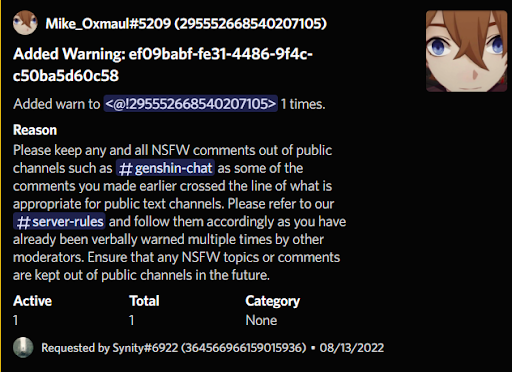
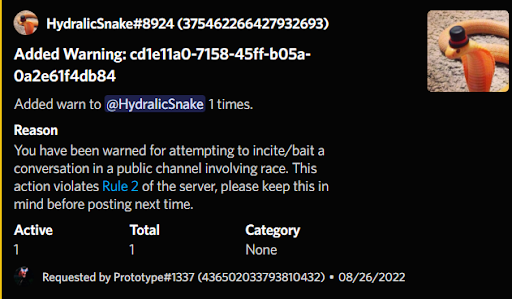
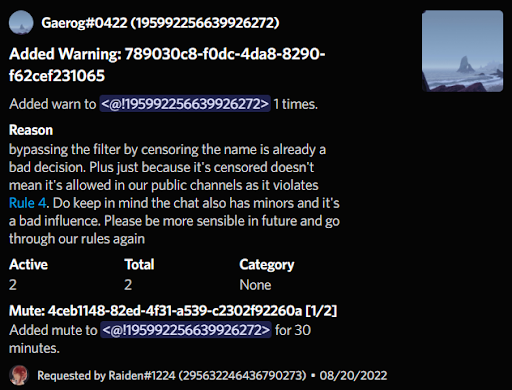
Formal warnings will deliver the reason you write for it to the person that is receiving it so write it as if you are speaking to the person directly. Try to be thorough but warnings don't have to be long either. Explain to the person what they did wrong, which rule they broke if they did, and to do better in the future.
Use a professional tone when writing formal warnings as we do not want them to come off as simple and something we did not take the time to write out. The more precise your explanation is, the better.
If you feel that you need a guide or example of what a warning should look and read like, feel free to refer to the examples below of how other moderators write their warnings and try to emulate it in your own style when writing warnings.
| Example Warnings | ||
|---|---|---|
 |  |  |
Moderation Commands & Channels
All commands can be used with the prefix of h! or with a /. Using a slash will make the usage of commands much easier! When using slash commands there will be prompts that you can click above the text box.
h!whois
/whois user:(Put the person's ID or name here)
The whois command will tell you when an account was created and when it joined the server. This can come in handy to spot trolls that just joined to cause problems and let you know that they should be muted and put for a ban by @synity.
It is important to check the h!whois command to see when a user has just joined the discord. Newly joined users should be treated more seriously or with more leniency depending on the situation.
- Where a user is new and has made a genuine mistake, it is important to treat them with leniency and redirect them to read the rules in #server-rules.
- Where a user is new and has clearly joined to cause server chaos and disruption, a harsher attitude is to be used.
h!history
/history user:(Put the person's ID or name here)
The history command should be used before giving any warning, whether verbal or formal, to know if the person is a repeat offender or not. If the person already has a note from another mod then you should proceed with a formal warning. If their last history is already a formal warning or they have no notes and warns then only give a verbal in the text chat and log it with a note.
- Try to lean towards leniency. Always give the people the benefit of the doubt unless their infraction history is severe.
h!note
/note user:(Put the person's ID or name here) note:(Write your note here)
Notes do not send a message to the user and are only to log verbal warning given to the person in a chat or DM so that other mods can know that they have been given an informal warn and should receive a formal warning if they repeat their infraction.
h!warn
/warn user:(Put the person's ID or name here) reason:(Write what you want the user to see here)
Warns should be written with the intent of the person that it is being given to see it. Whereas notes will be seen by mods which means they can be written informally, warns should always be written formally and should state the reason as to why they are being warned, the rule they broke, and usually something along the lines of to follow our server rules.
h!hardmute
/hardmute user:(Put the person's ID or name here) length:(Put the length of the mute)
The hardmute command mutes the person and does not let the user see any of the text channels in the server. This tool should be used when there is a troublemaker or troll account that is spamming inappropriate content so that they cannot send anything while either a warning or ban is being written.
h!slowmode
/slowmode channel:(channel name) length:(slowmode length)
If a chat is ever being unruly and too many messages are being sent use this command to add a slowmode.
h!pardon
/reprimandpardon id:(ID of the reprimand you’re pardoning) reason:(Reason for pardon)
If you ever need to remove/forgive a note or formal warning for whatever reason, you can use the pardon command to remove the note or formal from that person’s history
h!update
/reprimandupdate id:(ID of the reprimand you’re changing) reason:(Updated reason here)
If you need to update the reasoning behind a warning or need to change what a note includes or how it is written, you can use the update command. This can be used when you accidentally format a note incorrectly or if you want to add in more evidence that was not included in the initial note,
h!avatar
/avatar user:(Put the person's ID or name here)
Need to check if a user’s profile picture breaks the server rules but can’t quite make it out? Use this command to make a user’s profile picture large enough to view in the case that it might be inappropriate.
Extra Tips
Writing Notes
You can include a screenshot of evidence to provide context for other mods by sending the screenshot in #mod-logs, copying the message link, and putting the note in this format:
[context word](message link)
Writing Warnings
You can use a shortcut to include which rule was broken by writing it in this format: $rule1, $rule2, etc. Replace the number with the rule that you want to include.
Mod Relevant Channels
- Genshin Impact
- Honkai: Star Rail
#mod-logsis where all command usage goes if you are not a trial mod#millelith-headquartersto ask any questions you might have on what to do in a certain case or if you're confused with anything.#highlight-alertswill show any messages that contain a word that typically leads to or involves rule-breaking behavior.#ht-message-logswill log any edited or deleted messages. Use this to gather evidence of rule-breaking behavior if a user tries to hide it.#reportsany reports made by users will show up here. You will be provided with a log of the chat they sent it from and the reason they gave for it.#mod-chatis a channel for all mods from all pillars to be able to discuss a topic together if necessary.#training-roomthis channel only applies to you if you are a trial mod. In this channel, you will be taught how to issue mod actions and use any bot commands.
#mod-logsis where all command usage goes if you are not a trial mod#mod-talkto ask any questions you might have on what to do in a certain case or if you're confused with anything.#highlight-alertswill show any messages that contain a word that typically leads to or involves rule-breaking behavior.#hutao-message-logswill log any edited or deleted messages. Use this to gather evidence of rule-breaking behavior if a user tries to hide it.#mod-reportsany reports made by users will show up here. You will be provided with a log of the chat they sent it from and the reason they gave for it.
Carl Highlights
Do NOT make the existence of this feature obvious to normal members. This includes, but is not limited to: directly telling others of its existence, always hopping into a chat after someone uses a highlighted word thereby making it obvious you were notified, and abusing the highlight system to appear in any chat your name is mentioned in if you have it in your highlighted word list.
The highlighting system provided by Carl lets you make a word list of words that you want to be notified of when they are used in the server by Carl. This can be useful to know when a discussion is either rule-breaking or is about to derail. Usually, people will unknowingly set off a Carl highlight by saying common highlighted words like “mods”, “homophobic”, etc. Any words that are related to rule-breaking discussions can be highlighted to let you know when to check in on a chat.
!hl add
!hl add word
Need to check if a user’s profile picture breaks the server rules but can’t quite make it out? Use this command to make a user’s profile picture large enough to view in the case that it might be inappropriate.
!hl remove
!hl remove “word you want to remove”
Use this to remove a word from your highlight list.
!hl list
!hl list
Shows your highlight list.
!hl ignore
!hl ignore “#text-channel”
Use this in order not to receive notifications from Carl for certain text channels.