Website Resources
Welcome to the KQM Website team! This page is a repository of resources that are necessary or useful for your role.
Website Leadership
- Genshin Impact
- Honkai: Star Rail
- Site Owner:
@bubbleteas.moe(Yami)- Contact for site access, push, site functions, and any other higher-level issues.
- Ping Yami first for minor updates and site issues that
@chasing_haze,@irokei, or@nyteshadowscannot fix. - Ping both Yami and
@reensfor pushes.
- Webmaster:
@reens- Contact for site access, push, and any other higher-level site issues.
- TC Vice Co-Heads (Managing Editors):
@chasing_haze,@irokei- Contact these people for day-to-day website concerns.
- Frontpage Access:
@chasing_haze,@irokei,@nociii,@reens- Ping one of these people after your guide has been QCed.
- KQM GI TCL:
@tibowl - Compendium:
@artesians - Onboarding Site:
@artesians,@nyteshadows
- Site Owner:
@bubbleteas.moe(Yami)- Contact for site access, push, site functions, and any other higher-level issues.
- Ping Yami first for minor updates and site issues that
@chasing_haze,@irokei, or@nyteshadowscannot fix. - Ping both Yami and
@reensfor pushes.
- Webmaster:
@reens- Contact for site access and any other higher-level site issues.
- TC Vice-Leads (Website):
@chasing_haze,@nyteshadows- Contact these people for day-to-day website concerns.
- Frontpage Access:
@chasing_haze,@nyteshadows,@irokei,@reens- Ping one of these people after your guide has been QCed.
- KQM SRL:
@tibowl - Onboarding Site:
@artesians,@nyteshadows
Website Access
- Genshin Impact
- Honkai: Star Rail
Editors Site
Contact: @reens, @bubbleteas.moe
Description: The website before it goes live.
- Use this to check your work.
- Username: keqingmains
- Password: ilovekeqing
Publisher Portal
Contact: @reens, @bubbleteas.moe
Description: Access to the KQM GI WordPress site editor. Transcribe, update, and upload things to the website here.
- Categories
- Posts - Extended Character Guides
- Media - Upload images to the Media Library
- Pages - Miscellaneous pages with limited access
- Infographics - Infographic pages
- Misc - Miscellaneous Guides
- Quick Guides - Character Quick Guides
- Access
- DM
reensfor access - Username: your email
- Password: your password (can change)
- DM
WordPress Portal
Contact: @reens, @bubbleteas.moe
Description: Access to the KQM GI WordPress site editor. Transcribe, update, and upload things to the website here.
- Categories
- Posts - Extended Character/Theorycrafting Guides
- Media - Upload images to the Media Library
- Pages - Miscellaneous pages with limited access
- Infographics - Infographic pages
- Misc - Miscellaneous Guides (TCTs, Blogs)
- Quick Guides - Character Quick Guides
- Access
- DM
reensfor access - Username: your email
- Password: your password (can change)
- DM
Any changes to HSR site go live to the public immediately. Keep posts private until ready to publish.
Guest Account
This guest account for the WordPress site can be shared with Authors and Translators so they can see transcribed guides before they go live.
- Genshin Impact
- Honkai: Star Rail
- Go to this URL: https://editors.keqingmains.com/wp-admin/
- Enter these credentials into the pop-up.
user: keqingmainspass: ilovekeqing - Enter these second credentials in the Login area.
user: guideauthorpass: keqingmainsauthor2023$$ - Go to the guide URL on the Editor site: https://editors.keqingmains.com/
- Go to this URL: https://hsr.keqingmains.com/wp-admin
- Enter these second credentials in the Login area.
user: guideauthorpass: keqingmainsauthor2023$$ - Go to the guide URL on the Editor site: https://hsr.keqingmains.com
Resources
Genshin
- Private Resouces (Do Not Share)
- Public Resources
KQM GI TCT Queue
Contact: @miannes, @kolvii, @chasing_haze, @irokei
Description: Organizing TC work. Please keep updated.
- Staff Directory - contact information for TC staff
- Guide Tasks - task list for guide-related projects
- Guides & Quick Guides - mastersheets for organization
- Changelogs - extended guide, quick guide, and infographic changelogs.
- Translation Queue Hub - coordinating work between Translators and Publishers
- Artist Responses - documenting previous artist response to permission requests
Editor Calendar
Contact: @irokei, @chasing_haze, @miannes, @kolvii
Description: Calendar with important dates. If you would like access to a color-coded version with edit permissions, DM irokei.
- Guide-Related Project Release Dates
- TENT means that the release is tentative and subject-to-change.
- These dates are entered on the ideal date, but can change as needed.
- Version Updates
- Character Releases
- 5-Star Character Banners
- Character Birthdays
- Anniversary and Other Events
KQM Website Editor Tutorial Video
Contact: @latiwings, @chasing_haze
Description: Watch before working on the KQM website. Explains how to transcribe guides to the website using WordPress.
CSS Guide
Contact: @reens
Description: Basic CSS and HTML guide. Please read if you are unfamiliar with either.
KQM GI Portrait Card Generator
Contact: @tibowl
Description: Generates team portraits and individual images for characters, elements, weapons, and artifact sets.
- Custom portraits can be uploaded if necessary.
- Split images are nice at 2 and 4. Avoid using 3-way splits.
- Remove the background and portrait padding to download just the image.
Video Embed Converter
Contact: @anon64942495 (3b00d)
Description: Generates custom HTML for YouTube video embeds for the website. Please use this instead of the native WordPress YouTube block if possible.
WEBP Converter
Contact: here
Description: Converts images to webp format.
- All images except infographics need to be converted before being uploaded to the Media Library.
- You can convert in batches and download as a zipped file.
- Convert at 100% quality.
Paimon’s Paintings
Contact: Genshin Wiki Staff
Description: All the officially released emotes for Genshin Impact.
Game Assets
Contact: theBowja
Description: Updated repository of the game’s assets.
Realtime Colors
Description: Create your color palette here if you want.
Contrast Checker
Contact: @nyteshadows (for questions)
Description: Checks the contrast between two colors.
Accessibility Checker Extension
Contact: @nyteshadows (for questions)
Description: Evaluates the accessibility of web pages.
W3 CSS Tutorials
Contact: help@w3schools.com
Description: Look up, learn, and experiment with CSS. Other languages are also on the W3 site.
HSR
- Private Resouces (Do Not Share)
- Public Resources
KQM HSR TC Queue
Contact: HSR Lead TC Staff, @cynematic
Description: Kanban board for organizing TC work on ClickUp. Please keep updated. Contact Cyn @cynematic for access.
HSR TC Google Drive
Contact: HSR Lead TC Staff
Description: Resources and projects in one place.
Game Assets
Contact: @tibowl
Description: HSR game assets folder.
KQM Website Editor Tutorial Video
Contact: @latiwings, @chasing_haze
Description: Watch before working on the KQM website. Explains how to transcribe guides to the website using WordPress.
CSS Guide
Contact: @reens
Description: Basic CSS and HTML guide. Please read if you are unfamiliar with either.
KQM SRL Portrait Card Generator
Contact: @tibowl
Description: Generates team portraits and individual images for characters and equipables.
- Custom portraits can be uploaded if necessary.
- Split images are nice at 2 and 4. Avoid using 3-way splits.
- Remove the background and portrait padding to download just the image.
Video Embed Converter
Contact: @anon64942495 (3b00d)
Description: Generates custom HTML for YouTube video embeds for the website. Please use this instead of the native WordPress YouTube block if possible.
WEBP Converter
Contact: here
Description: Converts images to webp format.
- All images except infographics need to be converted before being uploaded to the Media Library.
- You can convert in batches and download as a zipped file.
- Convert at 100% quality.
Pom-Pom Gallery
Contact: Honkai: Star Rail Wiki Staff
Description: All the officially released emotes for Honkai: Star Rail.
Realtime Colors
Description: Create your color palette here if you want.
Contrast Checker
Contact: @nyteshadows (for questions)
Description: Checks the contrast between two colors.
Accessibility Checker Extension
Contact: @nyteshadows (for questions)
Description: Evaluates the accessibility of web pages.
W3 CSS Tutorials
Contact: help@w3schools.com
Description: Look up, learn, and experiment with CSS. Other languages are also on the W3 site.
Instructions
Quick Guide Transcription
Please refer to the KQM Website Editor Tutorial below for a narrated and in-depth tutorial.
Workflow:
- Check your work at
editors.keqingmains.com/q/[character]-quickguideinstead of using the “Preview” button since it can bug out. - Update the TCT Queue and check off steps as you go.
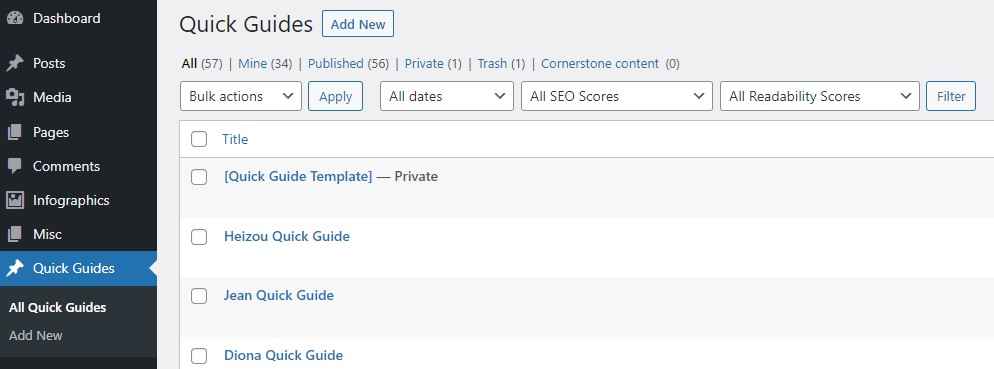
Copy the Quick Guide Template - Access the Publisher Portal, go to the Quick Guides category on the panel on the left, and then Duplicate the [Quick Guide Template].
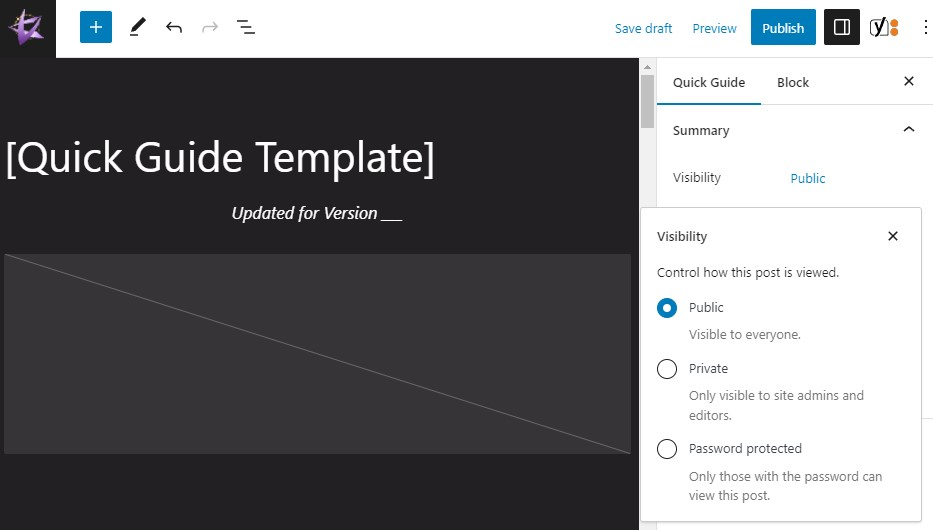
Make the Draft Private - Make the post Private by adjusting the Visibility on the panel on the right within the WP Editor UI.
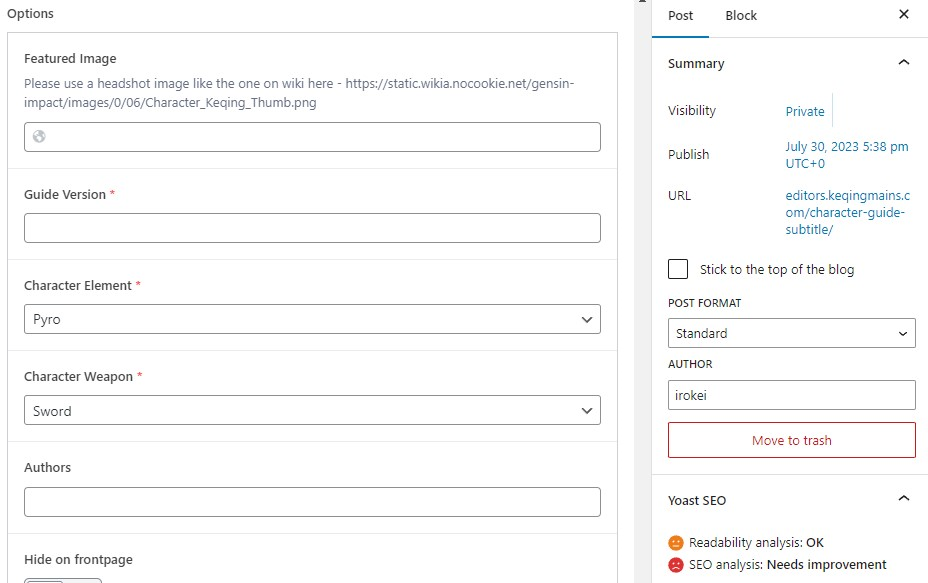
Fill Out Metadata - Adjust the following to match your character. All the metadata is located at the bottom of the WP Editor under the CSS Section.
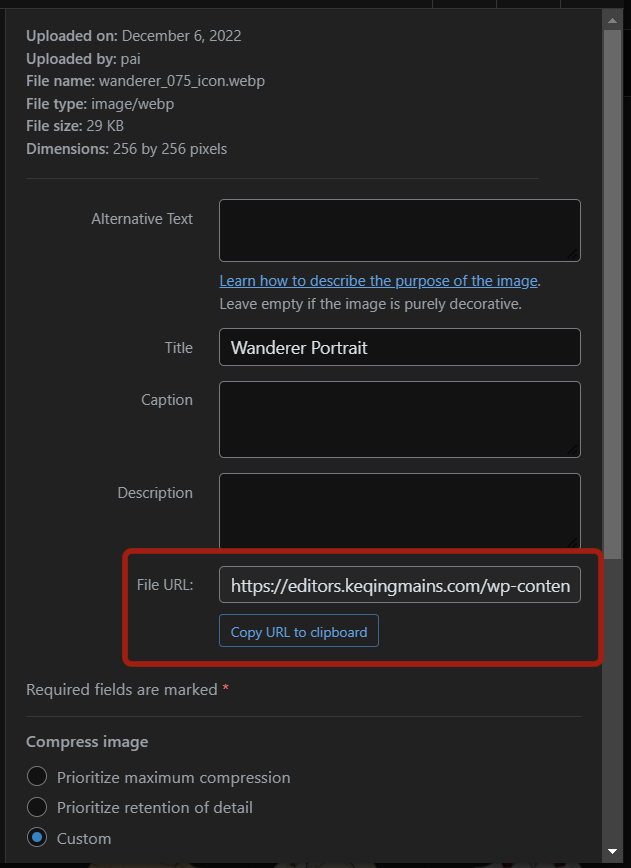
- Featured Image - Find the URL for the character’s portrait in Media Library > Character Portraits.
- Guide Version - The in-game version that the guide will be released.
- Element & Weapon - Self-explanatory.
- There is no full guide, only a quick guide? - If this quick guide is for a newly-released character, then you should toggle this to Yes.
- Focus Keyphrase - Just put the character’s name.
- Slug - In the Post panel on the right or in the Slug section, change the URL slug to editors.keqingmains.com/[character]-wip
- Meta Description - Copy the wording from recently published quick guides or the template there. Make sure the bar underneath is green so the entire description fits on mobile view.
- Featured Image - Find the URL for the character’s portrait in Media Library > Character Portraits.
Copy-Paste Text Content - Simply copy-paste content from the Google Docs to the WP Editor.
- Headings - Make sure you have the proper heading level (H1, H2, H3, etc.)
- Tables - You can copy-paste entire tables from the Google Docs into the WP Editor.
- Line Breaks - Shift+Enter line breaks in Google Docs do not transfer to WP well. You may need to add another line break in WP.
- Bold & Italics - Make sure table content is properly and consistently bolded. Make sure Talent and Constellation descriptions are in italics. Check that the Version number at the top is also in italics.
- Internal Links - Add internal links using Headers like #Talents where applicable
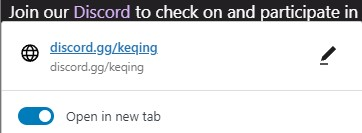
- External Links - Add external links to the quick guides for characters in tables (New Content and Notable Characters). Check that every external link opens in a new tab.
Add or Replace Images - All images not currently in the Media Library must be uploaded as webp (except infographics). Check Upload Image to Media Library for a step-by-step how to.
- Header Image - Replace the image block at the top of the page with the header image from the Google Docs (should already be in correct format).
- Infographics - Upload Build and Teams infographics from the Media Library. Use columns to fit multiple Infographics in the same line.
- Talent & Constellation Icons - Replace the Xingqiu Talent and Constellation icons with the Talents for your character.
- If you need to upload icons, do not upload the edited 45x45 icons from the Genshin Wiki.
- You should upload them as the unedited webp file. This can be done by deleting everything from /revision and after in the URL before downloading the image.
- Team Images - Make sure the dimensions are 768x212. Add captions as needed. If there is no caption, put a 15px spacer block underneath.
- Artifacts & Weapons - These do not have to be reuploaded for now.
CSS - You will need to make a few adjustments to the CSS section and add custom CSS classes to WP blocks.
- Colors - The only thing in the CSS Section you need to change are the HEX codes for the colors. Use the character’s color palette.
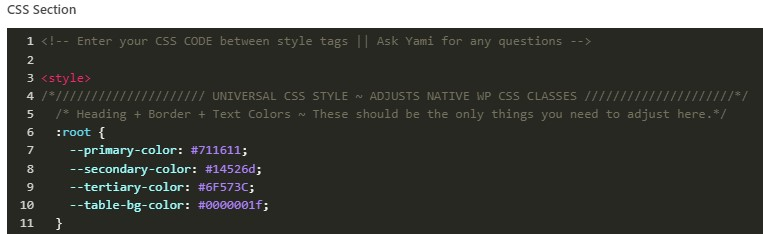
For tabs and dropdowns, you will need to adjust the colors manually (Sorry!)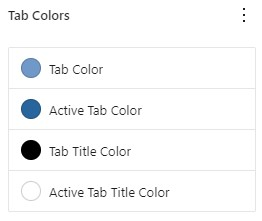
- Custom CSS Classes - These custom CSS classes are the only ones needed in Quick Guide transcription.

Add these to the Advanced Block for each block that needs it.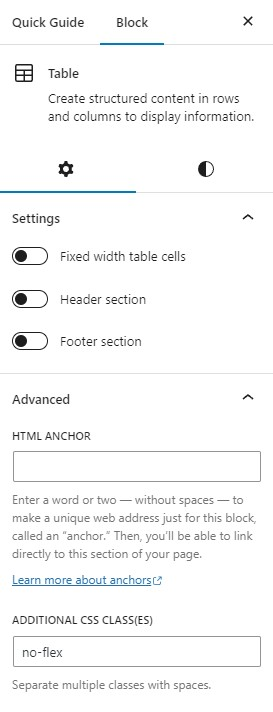
- Colors - The only thing in the CSS Section you need to change are the HEX codes for the colors. Use the character’s color palette.
Get a QC - Every transcription needs to be quality-checked for errors prior to publication. Use the Transcription QC Checklist yourself before asking for QC. Ask in
#tc-publishers. Everyone misses a few things and we give detailed feedback due to our high standards, so don’t worry if you get a lot of feedback.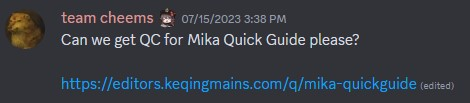
Request Front Page - Ping one of the following people in
#tc-publishersto add your guide to the front page, adjust slugs, and associate the quick guide to the main guide.- Ping first:
@chasing_haze,@irokei,@nociii - Ping if no response from above:
@reens,@miannes
- Ping first:
Request Push - Ping
@reenssaying your guide is ready for push. You only need to do this to meet a deadline to make sure it goes through.After Guide Goes Live - There are 3 things to do!
- Update the TCT Queue “Quick Guide Changelog” and “Quick Guides” tab if you have not done so already.
- Ping
@ekoapor@reens(if eko is unavailable) to add the new guide to Kikin Bot. - In the Media Server, make a socials request post and ping @erisdc.
- Check the Editor Calendar for dates.
- You can ask
@chasing_hazeor@irokeito make this request for you if you want.
Maintain As Needed - Check
#website-feedbackand staff chats for feedback.
Extended Guide Transcription
Please refer to the KQM Website Editor Tutorial for a narrated and real-time tutorial.
Workflow:
- Check your work at
editors.keqingmains.com/[character]-wipinstead of using the “Preview” button since it can bug out. - Update the TCT Queue and check off steps as you go.
- Keep in touch with the Guide Authors for changes to the organization of their ideas (such as putting things in Content Filters).
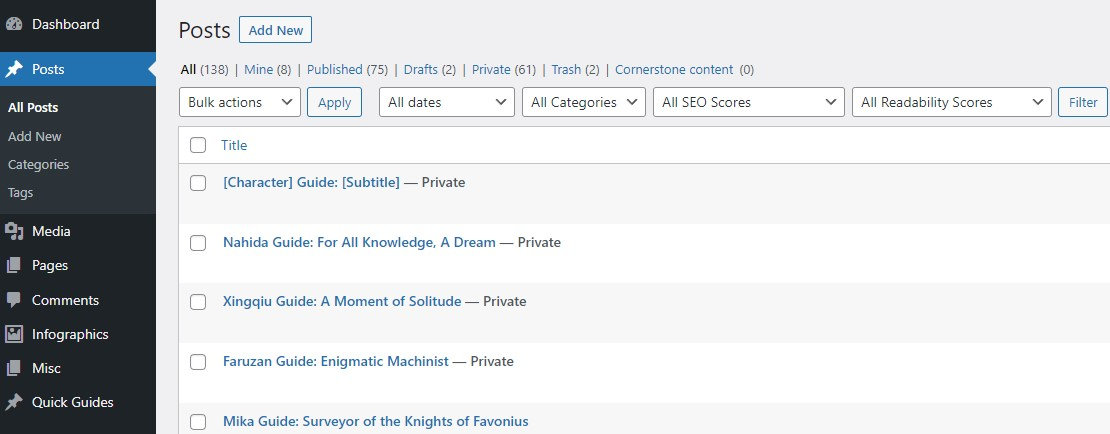
Copy the Extended Guide Template - Access the Publisher Portal, go to the Posts category on the panel on the left, and then click "Duplicate This" [Character] Guide: [Subtitle].
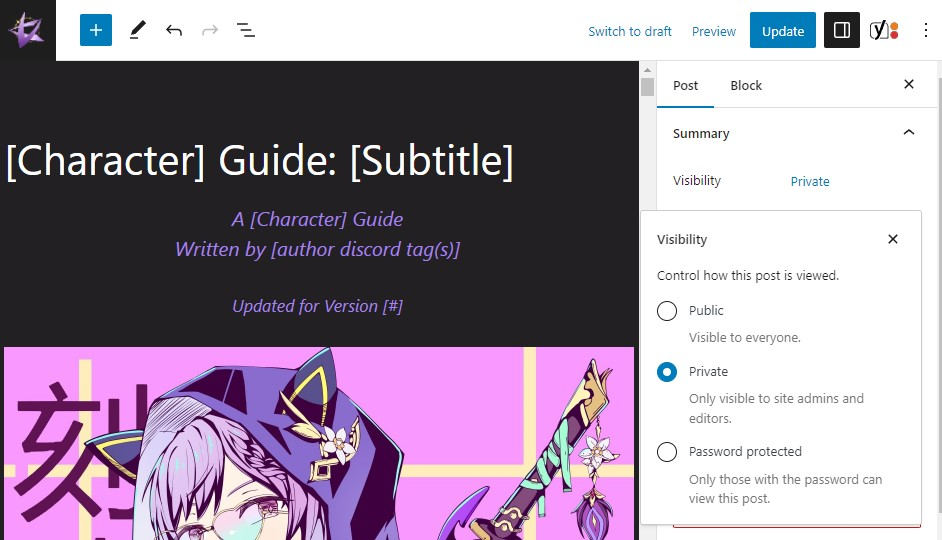
Make the Draft Private - Make the post Private by adjusting the Visibility on the panel on the right within the WP Editor UI.
Fill Out Metadata - Adjust the following to match your character. All the metadata is located at the bottom of the WP Editor under the CSS Section.
- Featured Image - Find the URL for the character’s portrait in Media Library > Character Portraits.
- Guide Version - The in-game version that the guide will be released.
- Element & Weapon - Self-explanatory.
- There is no full guide, only a quick guide? - If this quick guide is for a newly-released character, then you should toggle this to Yes.
- Focus Keyphrase - Just put the character’s name.
- Slug - In the Post panel on the right or in the Slug section, change the URL slug to editors.keqingmains.com/[character]-wip
- Meta Description - Copy the wording from recently published quick guides or the template there. Make sure the bar underneath is green so the entire description fits on mobile view.
- Featured Image - Find the URL for the character’s portrait in Media Library > Character Portraits.
Copy-Paste Text Content - Simply copy-paste content from the Google Docs to the WP Editor.
- Headings - Make sure you have the proper heading level (H1, H2, H3, etc.)
- Tables - You can copy-paste entire tables from the Google Docs into the WP Editor.
- Line Breaks - Shift+Enter line breaks in Google Docs do not transfer to WP well. You may need to add another line break in WP.
- Bold & Italics - Make sure table content is properly and consistently bolded. Make sure Talent and Constellation descriptions are in italics. Check that the Version number at the top is also in italics.
- Internal Links - Add internal links using Headers like #Talents where applicable
- External Links - Add external links to the quick guides for characters in tables (New Content and Notable Characters). Check that every external link opens in a new tab.
- Videos - For videos, there are two options for embeds. For most guides, you want to use 3b’s custom HTML block embed. If your guide has a maximum of 5 videos, you can use the native YouTube WP block.
Add or Replace Images - All images not currently in the Media Library must be uploaded as webp (except infographics). Check Upload Image to Media Library for a step-by-step how to.
- Art - Artwork needs two things added to the WP image block in Advanced Block settings.
lati-imagelati-artwork-toHide(except the first piece of art)
- Infographics - Upload Build and Teams infographics from the Media Library. Use columns to fit multiple Infographics in the same line.
- Talent & Constellation Icons - Replace the Xingqiu Talent and Constellation icons with the Talents for your character.
- Team Images - Make sure the dimensions are 768x212. Add captions as needed. If there is no caption, put a 15px spacer block underneath.
- Emotes - Official character emotes are often used in tables and under headings.
- If the emote is in the Media Library and uploaded as a webp, use that.
- If the emote is neither of the above, take from Paimon’s Paintings.
- Artifacts & Weapons - These do not have to be reuploaded for now.
- GIFs - There is a blanket ban on GIFs. If you see a GIF, request a link to a video instead.
- Art - Artwork needs two things added to the WP image block in Advanced Block settings.
CSS - You will need to make a few adjustments to the CSS section and add custom CSS classes to WP blocks.
- Colors - The only thing in the CSS Section you need to change are the HEX codes for the colors. Use the character’s color palette.
For tabs and dropdowns, you will need to adjust the colors manually (Sorry!) - Custom CSS Classes - These custom CSS classes are the only ones needed in Quick Guide transcription.

Add these to the Advanced Block for each block that needs it.
- Colors - The only thing in the CSS Section you need to change are the HEX codes for the colors. Use the character’s color palette.
Get a QC - Every transcription needs to be quality-checked for errors prior to publication. Use the Transcription QC Checklist yourself before asking for QC. Ask in
#tc-publishers. Everyone misses a few things and we give detailed feedback due to our high standards, so don’t worry if you get a lot of feedback.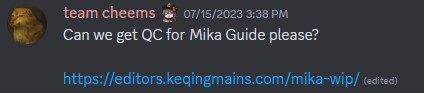
Request Front Page - Ping one of the following people in
#tc-publishersto add your guide to the front page, adjust slugs, and associate the quick guide to the main guide.- Ping first:
@chasing_haze,@irokei,@nociii - Ping if no response from above:
@reens,@miannes
- Ping first:
Request Push & Redirect Change - Ping
@reenssaying your guide is ready for push. If your guide has a live redirect to a quick guide, please tell her to delete the redirect also.After Guide Goes Live - There are 3 things to do!
- Update the TCT Queue “Quick Guide Changelog” and “Quick Guides” tab if you have not done so already.
- Ping
@ekoapor@reens(if eko is unavailable) to add the new guide to Kikin Bot. - In the Media Server, make a socials request post and ping @erisdc.
- Check the Editor Calendar for dates.
- You can ask
@chasing_hazeor@irokeito make this request for you if you want.
Maintain As Needed - Check
#website-feedbackand staff chats for feedback.
Transcription QC Checklist
- Metadata
- Featured Image
- Guide Version
- Element & Weapon
- Related Quick Guide (or not)
- Focus Keyphrase
- Slug
- Meta Description
- Links
- Internal Links - Take you where it says
- External Links - Open to new tab
- Tabs & Dropdowns
- Tabbed Content starts on the first tab
- Talents section starts on Normal Attack tab
- Constellations section starts on C1 tab
- The descriptions for every Talent and Constellation are correct and don’t have formatting errors or copy-paste errors
- Dropdowns are collapsed on desktop and mobile
- Spacing
- Images without a caption have spacing before the next paragraph.
- Line breaks (Shift+Enter) are done correctly.
- No text walls.
- Elements are properly centered
- Tables
- Cell widths and text-wrapping
- Bolding
- Images
- Not too big
- Captions are proper
- Videos
- Go to the correct video
- Captions are proper
- Headings & Table of Contents
- Headings are all in the right hierarchy and order
- ToC isn’t extremely long
- ToC headings are one line (can shorten to something that makes sense)
- Colors
- There is enough contrast between the text and background color
- The colors make sense
- The colors are not too saturated, similar in hue, or ugly
- Mobile
- There isn’t giant text or huge spaces
- Tables and borders look proper
- Page loads quickly
Upload Image to Media Library
- Check For Previous Upload - Image assets are often uploaded to random guides and character assets can be shared between quick and extended guides.
- You can use the search feature with “All Files” selected.
- You can also skim the relevant folder(s).
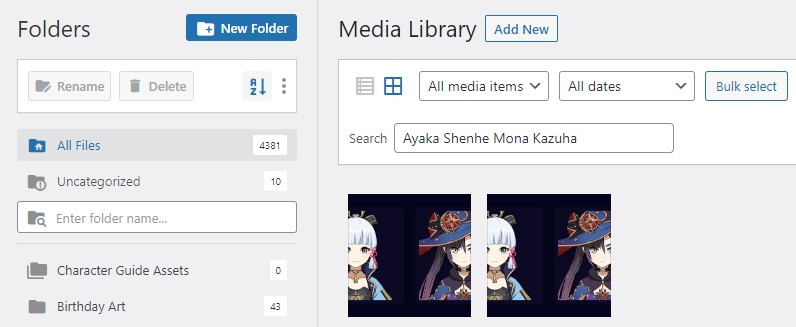
- Choose the Correct File Format - Make sure your image is in the correct file format. Convert if necessary.
- Infographics can be uploaded as an uncompressed png.
- Everything else should be uploaded as a webp.
- GIF and GIFV formats are not allowed. Instruct guide authors to upload videos to YouTube.
- Choose Appropriate File Names - Make sure your image has an appropriate name.
- Character assets must have the character name.
- Team portraits must have all characters or elements included in order left to right.
- Talents and Constellations should be formatted like [Character][Constellation #] [Name of Con]
- Upload - Click “Add New” > “Select Files” > Highlight images you want to upload > “Open”
- Organize - You can upload directly to a folder. If you did not select a folder, it will automatically go into Uncategorized.
- Guide assets go into the character’s folder in “Character Guide Assets”.
- The other folders are self-explanatory.
- Images in Uncategorized are periodically deleted, so if you need to delete an image that someone else uploaded, you can move it there.
Upload New Infographic Format
- Go to
final-productsin the Media Server and download the infographic as is.- React to the message with a checkmark.
- Name the downloaded image as
Character-Infographic-4.2(or whatever game version it is). - You do not need to convert to webp or compress the image.
- Go to the New Infographics tab in the TCT Queue and add your name to the
Uploadercolumn. - Upload the infographic to the Media Library in WordPress.
- Create a page under the Infographics category.
- Title the page appropriately.
- [Character]
- [Character][Playstyle] if there are different infographics for different playstyles
- Fill in the metadata at the bottom correctly.
Featured Imagewhere it only allows you to put a URL is for the character portrait URL in the Media Library.
- Add your infographic as the
Featured Imageon the RIGHT panel (you have to click a button and select from the Media Library). - Make sure your post is
PublishedandPublicin WordPress. - Press
Update. - Search for the old infographics in the Infographic section on WordPress.
- Change the Visibility to
Privatefor each post. - Press
Update.
- Change the Visibility to
- Add the new infographic to the corresponding character’s Quick Guide
Infographicsection.- If there is no infographic section, just make one and use
H1heading. - If there is already an infographic section, then just replace it with the new one.
- Make sure to press Update and check the guide page.
- If there is no infographic section, just make one and use
- Add the infographic to the corresponding character's Extended Guide
TL;DRsection.- If there is no infographic section, just make one and use
H1orH2depending on what makes sense. - If there is already infographic(s) there, then just replace it with the new one.
- Make sure to press Update and check the guide page.
- If there is no infographic section, just make one and use
- Go to the TCT Queue and mark the infographic status as
On Sitein the dropdown. - Fill in the
Datecolumn if it needs it. - You're done!
Contact
@irokeior@chasing_hazefor any questions or concerns.
Update Existing Infographic
- Upload the infographic to the Media Library.
- Find the correct page under the Infographics category. Search as needed.
- [Character] Build
- [Character] Teams [1/2/3]
- Update the Version for your infographic at the bottom in the metadata.
- Replace your infographic as the “Featured Image”.
- Press Update and check that you updated with the correct image.
- Add the updated infographic to the corresponding character’s quick guide and extended guide. Make sure to press Update and check it!
- Update the TCT Queue.
Slug Update & Quick Guide Connection
- Go to the old character guide
- Change the slug to
/[character]-old - Scroll down to the bottom and unlink the quick guide
- Make the old extended guide page private
- Update
- Go to the [character] quick guide and toggle the thing that says there is no extended guide
- Update
- Go to the new guide
- Change the slug to
/[character] - Scroll down to the bottom and link the quick guide
- Make public
- Update
Front Page Update (Additional Perms Required)
- Double Check URLs - Check to make sure the guide is public, the slug is correct, and the quick guide connection is done properly.
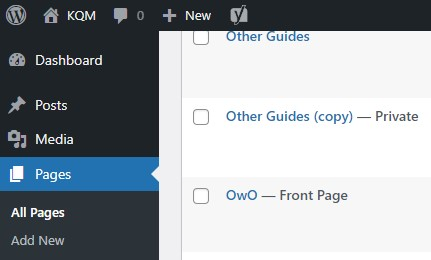
- Access the Front Page - Go to the Pages category and find OwO - Front Page.
- Scroll Down - Scroll down to Homepage
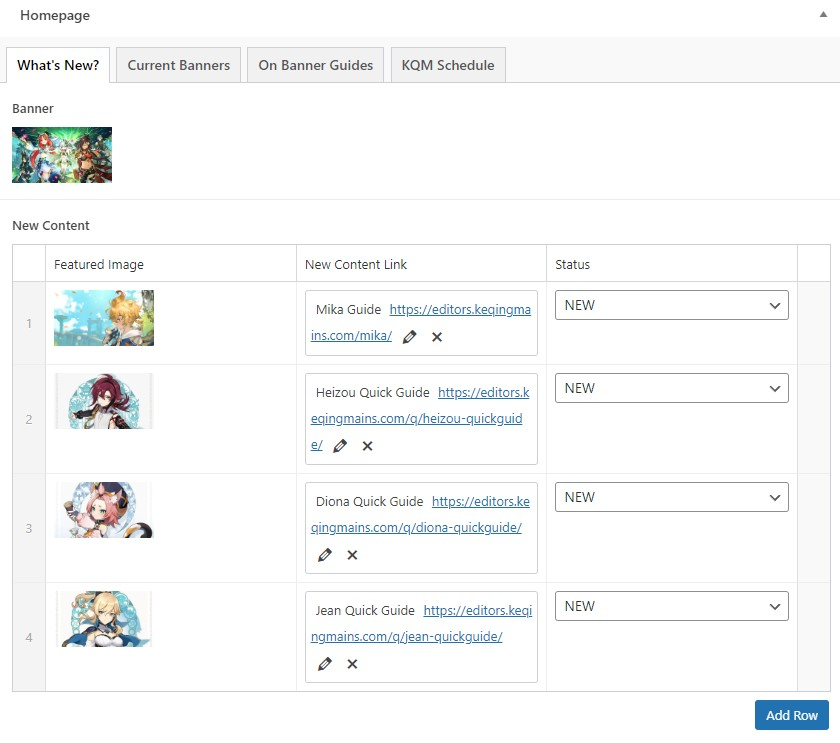
- Add New Content - Click the + in the circle on the right hand side to add a new guide.
- Featured Image - Change this to the header image for Quick Guides and a cropped version of the first art in an Extended Guide.
- The image should be 1080x600.
- Use webp.
- New Content Link - You need to manually delete an Extended Guide’s subtitle after selecting it.
- Status - NEW or UPDATED
- Delete Old Guides - You can click the x on the right to delete old guides.
- 4 Guides should always be there.
- 5 Guides are okay if they are all new.
- Update - Update the page.
- Check - Check to make sure it’s all good. Also check that the character guides are proper in the search feature near the bottom of the front page.
CSS Section
Quick Guide & HSR Template
  /* Heading + Border + Text Colors ~ These should be the only things you need to adjust here.*/
  :root {
    --primary-color: #711611;
    --secondary-color: #14526d;
    --tertiary-color: #6F573C;
    --table-bg-color: #0000001f;
  }

    /* Heading + Title Blocks */
  .entry-title, h1, h2, h3 {
    font-weight: bold;
    padding: 15px;
    vertical-align: middle;
    word-wrap: break-word;
    text-align: center;
  }

  /* Title */
  .entry-meta {
    text-align: center;
  }

  .entry-title {
    background: var(--primary-color);
  }

  /* H1 */
  h1{
    background:  var(--primary-color);
    margin: 80px 0px 30px 0px;
  }
  /* H2 */
  h2{
    background:  var(--secondary-color);
    font-weight: bold;
    margin: 50px 0px 20px 0px;
  }
  /* H3 */
  h3{
    background:  var(--tertiary-color);
    font-weight: bold;
    margin: 40px 0px 15px 0px;
  }
  /* H4 */
  h4{
    background:  var(--tertiary-color);
    font-size: 20px;
    font-weight: bold;
    text-align: left;
    vertical-align: middle;
    margin: 15px 0px 10px 0px;
    padding: 10px 15px 10px 15px;
    display: table;}

  /* Image Captions */
    .wp-block-image figcaption {
    font-size: 20px !important;
    font-weight: bold;
  }

  /* Tables */
  .wp-block-table {  overflow-x: hidden !important; max-width: 100%; width: auto !important; border-radius: 0;}

  /* Tables Colors */
  .wp-block-table table, .wp-block-table td, .wp-block-table th{
    border: 2px solid var(--primary-color);}
  .wp-block-table table{
    background:  var(--table-bg-color);}

  /* Tables Wrapping */
  .wp-block-table {  overflow-x: hidden !important; max-width: 100%; width: auto !important; border-radius: 0;}
  .wp-block-table table {  width: 100% !important;  table-layout: auto;}
  .wp-block-table th, .wp-block-table td {word-wrap: break-word !important; overflow-wrap: break-word !important; white-space: pre-wrap !important; max-width: 100% !important;}

   /* Tables First Column Width ~ Add this to every 2-column table that isn't fixed width.*/
  .weapon-table td:first-child{
  width: 10rem;}

  /* Tables That Don't Flex On Mobile ~ Add this to every table that is not 2 columns. ER Requirements and Artifact Main Stats usually. */
  .no-flex {}

  /* Substats Box Formatting */
  .substats{
    max-width: 650px;
    margin: auto auto 30px;
    border: 1.5px solid var(--primary-color);
  }

  /* Team Slider Formatting */
   .ub_image_slider_image_caption {
    font-weight: bold;
    font-size: 20px;
    margin-top: 20px;
  }

   .swiper-container-horizontal>.swiper-pagination-bullets{
   bottom: 25px !important;
  }

  .swiper-pagination-bullet-active {
    background: #ffffff !important;
  }

  .swiper-pagination-bullet{
    background: var(--secondary-color);
    opacity: 100%;
  }

   @media only screen and (max-width: 699px){
   .swiper-pagination{
   top: 90px !important;
     }}

  /* Accordion Spacing Fix */
  .wp-block-ub-tabbed-content-tabs-content p:last-child {
    margin-bottom: 0;
  }

  .wp-block-ub-content-toggle-accordion-content-wrap p:last-child {
    margin-bottom: 0;
  }

   /* Tabbed Content Borders ~ Talents and Constellations */
  .wp-block-ub-tabbed-content .wp-block-ub-tabbed-content-tab-title-wrap {
    border-width: 2px;
    border-style: solid;
    border-color: var(--primary-color) var(--primary-color) var(--secondary-color) var(--primary-color) !important;

  }
  .wp-block-ub-tabbed-content .wp-block-ub-tabbed-content-tabs-content {
    border: 2px solid var(--secondary-color);
    margin-top: -1px;
  }

    /*Constellation Tabs*/
    .con .wp-block-ub-tabbed-content-tab-title-wrap {
    padding: 8.64px;
}

/*///////////////////// MOBILE CSS /////////////////////*/
/* Class: .separate-containers */
@media screen and (max-width: 940px) {.separate-containers .inside-article, .separate-containers .comments-area, .separate-containers .page-header, .separate-containers .paging-navigation,.one-container .site-content,.inside-page-header {
   padding: 0.8vw;}}

/* Class: .single-post, .single-misc */
@media screen and (max-width: 940px) {.single-post h1, .single-post h2, .single-post h3, .single-post h4, .single-post h5, .single-post p, .single-misc h1, .single-misc h2,.single-misc h3, .single-misc h4, .single-misc h5, .single-misc p {
    padding-left: 0.8vw !important;
    padding-right: 0.8vw !important;}}

/* Class: .wp-block-ub-tabbed-content */
@media screen and (max-width: 940px){
    .wp-block-ub-tabbed-content {margin: 3vw 0vw 3vw 0vw !important}
    .wp-block-ub-tabbed-content-tab-title {font-size: 2.8vw !important}
    .wp-block-ub-tabbed-content-tab-title-wrap {margin: 2vw 1vw 2vw 1vw !important}
    .wp-block-ub-tabbed-content-tab-holder{ width: 0; }
    .ub-tabbed-content-mobile-accordion { width: 100% }
    .wp-block-ub-content-toggle-accordion-title {margin-left: 10px}
    .wp-block-ub-tabbed-content-tab-holder.vertical-tab-width { display: none }
    .wp-block-ub-tabbed-content-tabs-content.vertical-content-width {width: 100%;}
    .ub-tabbed-content-mobile-accordion {padding-top:0;}
    .wp-block-ub-tabbed-content .wp-block-ub-tabbed-content-tabs-content {border: none; border-color: transparent; border-radius: 0 !important}
    .wp-block-ub-tabbed-content-accordion-toggle {font-size: 2.8vw; text-align: center; padding: 0.8vw; margin: 1vw 0vw 0vw 0vw; margin-left: auto; margin-right: auto; width: 80vw; border: none; border-color: transparent; border-radius: 0 !important}
    .ub-tabbed-content-mobile-accordion>.wp-block-ub-tabbed-content-tab-content-wrap {border: 0 !important}
    .wp-block-ub-content-toggle-accordion .wp-block-ub-content-toggle-accordion-title {padding: 0.8vw !important;}
    .wp-block-ub-content-toggle-accordion  {border-radius: 0 !important;}
    .wp-block-ub-content-toggle-accordion-title  {border-radius: 0 !important; margin: 0 !important;}
    .wp-block-ub-content-toggle-accordion-title-wrap  {border-radius: 0 !important; margin: 0 !important; padding: 0 !important}
    .ub-content-filter-tag {font-size: 2.8vw !important; padding: 0.5vw 1vw 0.5vw 1vw !important; vertical-align: center !important; text-align: center !important; min-height: 3.4vw !important; min-width: 10.64vw !important;}
    .wp-block-ub-content-toggle-accordion-state-indicator {height: 2.8vw !important; width 2.8vw !important}}

@media (min-width: 700px) and (max-width: 940px !important){
.wp-block-ub-tabbed-content-accordion-toggle.ub-tablet-display {
    display: block !important;
  }}

/* Mobile Heading + Title Blocks */
@media screen and (max-width: 940px) {
  .entry-title {font-size: 4vw !important;}
  h1 {font-size: 3.3vw !important;padding: 1.8vw !important;margin: 1vw 0vw 1vw 0vw !important;}
  h2:not(.hide-heading), h3 {font-size: 3.2vw !important;padding: 1.2vw !important;margin: 1vw 0vw 1vw 0vw !important;}
  h4 {font-size: 3.3vw !important;padding: 0.8vw !important;margin: 1vw 0vw 1vw 0vw !important;text-align: center;vertical-align: middle;font-weight: bold;display: auto;}
  h5 {font-size: 3.3vw !important;padding: 0.5vw !important; margin: 0vw 0vw 1vw 0vw !important;}
  h6 {font-size: 3vw !important;padding: 0.5vw !important; margin: 0vw 0vw 1vw 0vw !important;}
  p, table, li, .copyright-bar, .substats {font-size: 3vw !important;}
  p>img {width: 7vw !important;}
  .has-medium-font-size {font-size: 3vw !important}
  .wp-block-heading>img {width: 7vw !important;}
  .wp-element-caption {font-size: 2.4vw !important;}
  .leftsidebar_container {font-size: 4vw !important; width: 60vw !important; top: 0;}
  .leftsidebar_container ~ h1:not(.entry-title) {margin-top: 20px;}
  .wp-block-spacer {height: 1vw !important;}}

/*Mobile Table Styling */
@media screen and (max-width: 940px) {
  .wp-block-table:not(:has(td:nth-child(n+3))) {display: block; width: 100%; overflow-x: auto;}
  .wp-block-table table {table-layout: fixed !important; width: 100%;max-width: 100vw !important; border: none; border-collapse: collapse !important;}
  .wp-block-table:not(:has(td:nth-child(n+3))) tr {display: flex;flex-wrap: wrap;}
  .wp-block-table:not(:has(td:nth-child(n+3))) td {border-left: 1px solid var(--primary-color); border-right:1px solid var(--primary-color); border-bottom: 1px solid var(--primary-color);}
  .wp-block-table:not(:has(td:nth-child(n+3))) td:first-child {flex: 0 0 100%;}
  .wp-block-table:not(:has(td:nth-child(n+3))) td:not(:first-child) {flex: 1 0 0%;}
  .wp-block-table th, .wp-block-table td {word-break: break-word; overflow-wrap: break-word; border: none;}
  .wp-block-table:not(:has(td:nth-child(n+3))) td:before {content: attr(data-label); font-weight: bold;display: block;}
  .wp-block-table {border-radius: 0; border: none; border-collapse: collapse;}
  .wp-block-table tr:first-child td:first-child {border-radius: 0 !important; border: 1px solid var(--primary-color); border-bottom: none;}
  .wp-block-table tr:first-child td:last-child {border-radius: 0 !important; border: 1px solid var(--primary-color);}
  .wp-block-table tr:last-child td:first-child {border-radius: 0 !important; border: 1px solid var(--primary-color); border-top: none;}
  .wp-block-table tr:last-child td:last-child {border-radius: 0 !important; border: 1px solid var(--primary-color); border-top: none;}
  .no-flex td {border-collapse: collapse; border: 1px solid var(--primary-color) !important;}
  table td img {width: 10vw !important; height: auto;}}

/*Lati Mobile Stuff*/
@media screen and (max-width: 940px) {
  .lati-image figcaption {font-size: 1.8085vw;padding: 0.5319vw 2.1276vw 0.5319vw 2.1276vw;border-radius: 2.6595vw 0vw 2.6595vw 0vw;
    background-color: #000000;top: -5.85vw;display: inline-block;float: right;position: relative;z-index: 0 !important;}
  .lati-image img {border-radius: 2.66vw !important;}
  .lati-artwork.toggle-text {font-size: 2.4vw;display: inline-block;position: relative;white-space: nowrap;right: 17vw;}}

/*Swipers*/
@media screen and (max-width: 940px){
  .ub_image_slider_image_caption {font-weight: bold;font-size: 3vw;margin-top: 2vw !important;}
  .swiper-pagination .swiper-pagination-clickable .swiper-pagination-bullets {padding: 0 !important;}
  .swiper-container-horizontal>.swiper-pagination-bullets {bottom: 3vw !important;}
  .swiper-pagination-bullet {width: 0vw !important;height: 0vw !important;}
  .swiper-button-next .swiper-button-prev {position: fixed !important;margin-top: 4vw !important;}}
      :root {   --swiper-navigation-size: 4vw;}
/*///////////////////// END OF MOBILE CSS /////////////////////*/
Extended Guide Template
/*///////////////////// UNIVERSAL CSS STYLE ~ ADJUSTS NATIVE WP CSS CLASSES /////////////////////*/
  /* Heading + Border + Text Colors ~ These should be the mains things you need to adjust here.*/
  :root {
    --primary-color: #392f60;
    --secondary-color: #654f9d;
    --tertiary-color: #7a5bad;
    --quartenary-color: #8e70d0; /* This can be the same as tertiary color if you want. */
    --table-border-color: var(--tertiary-color); /* Table Border Color ~ Can adjust if you want. */
    --table-bg-color: #421B633D; /* Table Background Color ~ Changes some custom block backgrounds too. */
    --white-text: #ffffff;
    --light-text: #e0bcef;
    --dark-text: #1b2063;
  }

    /* Heading + Title Blocks */
    .entry-title, h1, h2, h3, h4 {
    padding: 15px;
    vertical-align: middle;
    word-wrap: break-word;
    text-align: center;
    border-radius: 15px;
    font-weight: bold;
  }

    /* Title */
  .entry-meta {
    text-align: center;
  }

  .entry-title {
    background: var(--primary-color);
    padding: 15px;
    text-align: center;
    vertical-align: middle;
    word-wrap: break-word;
    border-radius: 15px;
    color: var(--light-text);
  }

  /* H1 */
  h1{
    background:  var(--primary-color);
    margin: 80px 0px 30px 0px;
    color: var(--light-text);
  }
  /* H2 */
  h2{
    background:  var(--secondary-color);
    margin: 50px 0px 20px 0px;
    color: var(--light-text);
  }
  /* H3 */
  h3{
    background:  var(--tertiary-color);
    font-size: 25px;
    vertical-align: middle;
    margin: 50px 0px 15px 0px;
    color: var(--dark-text);
  }
  /* H4 */
  h4{
    background:  var(--tertiary-color);
    font-size: 20px;
    font-weight: bold;
    text-align: left;
    vertical-align: middle;
    margin: 15px 0px 10px 0px;
  }

  /* Separator Style ~ Can Change Color */
  .wp-block-separator {
    color: var(--secondary-color) !important;
    opacity: 100% !important;
  }

  /* Tabbed Content Borders ~ Adjusts the colors of Tabbed Content Blocks. */
  .wp-block-ub-tabbed-content .wp-block-ub-tabbed-content-tab-title-wrap {
    border: 2px solid var(--secondary-color);
    border-color: var(--secondary-color) !important;
  }
  .wp-block-ub-tabbed-content .wp-block-ub-tabbed-content-tabs-content {
    border: 2px solid var(--secondary-color);
    border-radius: 15px;
  }

  /* Tabbed Title Buttons Styling ~ Colors for Buttons from Tabbed Content, NOT from Content Filters. */
   .wp-block-ub-tabbed-content-tab-title-wrap {
    border: var(--secondary-color) 2px solid !important;
    border-radius: 25px;
    margin-bottom: 10px;
  }

   .wp-block-ub-tabbed-content-tab-title-wrap.active {
    border: none;
    background-color: var(--secondary-color);
    color: var(--light-text);
  }

  /* Content Filtering Buttons Styling ~ Centers, recolors, and adjusts styles for Buttons from Content Filters, NOT from Tabbed Content. */
  .ub-content-filter-category {
    text-align: center !important;
  }

  .ub-content-filter-tag {
    border: 2px solid var(--tertiary-color);
    border-color: var(--tertiary-color) !important;
    border-radius: 15px;
    font-weight: bold;
    padding: 15px;
  }

/*///////////////////// CUSTOM CSS STYLE ~ ADD THESE CLASSES TO BLOCKS AS NEEDED /////////////////////*/
  /* ADD no-flex TO EVERY TABLE THAT DOES NOT HAVE EXACTLY TWO COLUMNS OR THAT YOU DON'T WANT TO FLEX ON MOBILE */
  .no-flex {}

  /* Quote Style ~ You need to add this CSS class to the paragraph block. */
  .quote-text {
    font-family: "Dancing Script";
    font-size: 25px;
    color: var(--light-text);
  }
  /* Assumptions Text Block Style ~ Need to add CSS class to the block. */
  .assumptions {
    background: var(--table-bg-color);
    border-left: 5px solid var(--quartenary-color);
    border-radius: 10px;
    padding: 15px
  }

  /* Rotations Text Block Style ~ Need to add CSS class to the block. */
  .rot {
    border-radius: 10px;
    background: var(--table-bg-color);
    border-left: 5px solid var(--quartenary-color);
    padding: 10px;
  }

  /* Talent Priority Text Block Style ~ Need to add CSS class to block if not already. */
   .talentsprio {
    border: 2px solid var(--secondary-color);
    border-radius: 15px;
    max-width: 700px;
    margin: auto auto 30px;
    color: var(--light-text);
    background: var(--table-bg-color);
  }

  /* Substat Priority Style ~ Need to add CSS class to block if not already. */
   .substatsprio {
    border: 2px solid var(--secondary-color);
    border-radius: 15px;
    max-width: 750px;
    margin: auto auto 30px;
    color: var(--light-text);
    background: var(--table-bg-color);
  }

  /*Rounded Table Style ~ Add one-row to tables with only 1 row.*/
  .one-row tr:first-child td:first-child {
    border-radius: 15px 0 0 15px !important;
  }
  .one-row tr:first-child td:last-child{
    border-radius: 0 15px 15px 0 !important;
  }

  /*Rounded Table Style ~ Add one-column to tables with only 1 column.*/
  .one-column tr:first-child td:first-child {
    border-radius: 15px 15px 0 0 !important;
  }
  .one-column tr:last-child td:first-child{
    border-radius: 0 0 15px 15px !important;
  }

  /* Fix First Column of Tables ~ Add either CSS class to a table to fix the width of the first column. You can change the width as your prefer but 11rem looks nice I think. */
  .weapon-table td:first-child {
    width: 11rem;
  }

  .friend-table td:first-child {
    width: 11rem;
  }

/*///////////////////// THINGS YOU PROBABLY DON'T NEED TO TOUCH /////////////////////*/
/* Talent Priority Table Formatting ~ This is only used for an old style Talent Priority Table block. */
  .talent-priority{max-width: 300px;margin: auto auto 30px;border: 1.5px solid var(--table-border-color);}

/* Substats Table Formatting ~ This is only used for an old style Substats Table block. */
  .substats{max-width: 650px;margin: auto auto 30px;border: 1.5px solid var(--table-border-color);}

/* Team Slider Formatting ~ You shouldn't need to touch this at all. */
  .ub_image_slider_image_caption {font-weight: bold;font-size: 20px;margin-top: 20px;}
  .swiper-container-horizontal>.swiper-pagination-bullets{bottom: 25px !important;}
  .swiper-pagination-bullet-active {background: #ffffff !important;}
  .swiper-pagination-bullet{background: var(--secondary-color);opacity: 100%;}
   @media only screen and (max-width: 699px){.swiper-pagination{top: 90px !important;}}

/* Lati Hide Artwork Toggle ~ Do Not Touch */
  .lati-artwork-hidden{display:none !important;}
  .lati-artwork.switch {position: relative;display: inline-block;width: 45px;height: 28px;}
  .lati-artwork.switch input {display:none;}
  .lati-artwork.slider {position: absolute;cursor: pointer;top: 0;left: 0;right: 0;bottom: 0;background-color: #36454F; -webkit-transition: .4s;transition: .4s;}
  .lati-artwork.slider:before {position: absolute;content: "";height: 20px;width: 20px;left: 4px;bottom: 4px;background-color: white;-webkit-transition: .4s;transition: .4s;}
  input:checked + .lati-artwork.slider {background-color: #50C878;}
  input:focus + .lati-artwork.slider {box-shadow: 0 0 1px #2196F3;}
  input:checked + .lati-artwork.slider:before {-webkit-transform: translateX(18px);-ms-transform: translateX(18px);transform: translateX(18px);}
  .lati-artwork.slider.round {border-radius: 34px;}
  .lati-artwork.slider.round:before {border-radius: 50%;}
  .lati-artwork.toggle-text {display: inline-block;position: relative;white-space: nowrap;right: 125px;}
  .lati-artwork.switch-container{display: flex; justify-content: right;}

/* Images ~ Add lati-image to any artwork. */
  .lati-image img {border-radius: 25px !important;display: block;}
  .lati-image figcaption {padding: 5px 20px 5px 20px; border-radius: 25px 0px 25px 0px;background-color: #000000;top: -35.1px;display: inline-block;float: right; position: relative;z-index: 1;}
  .wp-block-image:not(.lati-image) figcaption {font-size: 20px;font-weight: bold;}

/* Rounded Table Corners ~ Do Not Touch */
  .wp-block-table td{border: transparent;}
  .wp-block-table tr:first-child td:first-child {border-radius: 15px 0 0 0; }
  .wp-block-table tr:first-child td:last-child{border-radius: 0 15px 0 0; }
  .wp-block-table tr:last-child td:first-child {border-radius: 0 0 0 15px;}
  .wp-block-table tr:last-child td:last-child {border-radius: 0 0 15px 0;}

/* Accordion Block Rounding ~ Do Not Touch */
  .wp-block-ub-content-toggle-accordion  {border-radius: 15px;border: 2px solid;}
  .wp-block-ub-content-toggle-accordion-title  {border-radius: 15px;}
  .wp-block-ub-content-toggle-accordion-title-wrap  {border-radius: 13.9px;transform: scale(1.0055);}

/* Table Border + Background Formatting ~ Do Not Touch Colors Here */
  .wp-block-table table, .wp-block-table td, .wp-block-table th{border: 2px solid var(--table-border-color));}
  .wp-block-table table { border: transparent;  border-spacing: 0;  border-collapse: separate; border-radius: 15px; background: var(--table-bg-color);}

/* Rounded Table Corners ~ Do Not Touch Colors Here */
  .wp-block-table tr td {border-right: 2px solid var(--table-border-color); border-bottom: 2px solid var(--table-border-color);}
  .wp-block-table tr td:first-child {border-left: 2px solid var(--table-border-color);}
  .wp-block-table tr:first-child td{border-top: 2px solid var(--table-border-color);}

/* Accordion Spacing Fix ~ Do Not Touch */
  .wp-block-ub-tabbed-content-tabs-content p:last-child {margin-bottom: 0;}
  .wp-block-ub-content-toggle-accordion-content-wrap p:last-child {margin-bottom: 0;}

/* Constellation Tabs Padding ~ Do Not Touch */
  .con .wp-block-ub-tabbed-content-tab-title-wrap {padding: 7.64px;}

/*///////////////////// MOBILE CSS ~ CAN ADJUST IF THIS BREAKS SOMETHING - ASK IROKEI OR 3B /////////////////////*/
/* Class: .separate-containers */
@media screen and (max-width: 940px) {.separate-containers .inside-article, .separate-containers .comments-area, .separate-containers .page-header, .separate-containers .paging-navigation,.one-container .site-content,.inside-page-header {
   padding: 0.8vw;}}

/* Class: .single-post, .single-misc */
@media screen and (max-width: 940px) {.single-post h1, .single-post h2, .single-post h3, .single-post h4, .single-post h5, .single-post p, .single-misc h1, .single-misc h2,.single-misc h3, .single-misc h4, .single-misc h5, .single-misc p {
    padding-left: 0.8vw !important;
    padding-right: 0.8vw !important;}}

/* Class: .wp-block-ub-tabbed-content */
@media screen and (max-width: 940px){
    .wp-block-ub-tabbed-content {margin: 3vw 0vw 3vw 0vw !important}
    .wp-block-ub-tabbed-content-tab-title {font-size: 2.8vw !important}
    .wp-block-ub-tabbed-content-tab-title-wrap {margin: 2vw 1vw 2vw 1vw !important}
    .wp-block-ub-tabbed-content-tab-holder{ width: 0; }
    .ub-tabbed-content-mobile-accordion { width: 100% }
    .wp-block-ub-content-toggle-accordion-title {margin-left: 10px}
    .wp-block-ub-tabbed-content-tab-holder.vertical-tab-width { display: none }
    .wp-block-ub-tabbed-content-tabs-content.vertical-content-width {width: 100%;}
    .ub-tabbed-content-mobile-accordion {padding-top:0;}
    .wp-block-ub-tabbed-content .wp-block-ub-tabbed-content-tabs-content {border: none; border-color: transparent; border-radius: 0 !important}
    .wp-block-ub-tabbed-content-accordion-toggle {font-size: 2.8vw; text-align: center; padding: 0.8vw; margin: 1vw 0vw 0vw 0vw; margin-left: auto; margin-right: auto; width: 80vw; border: none; border-color: transparent; border-radius: 0 !important}
    .ub-tabbed-content-mobile-accordion>.wp-block-ub-tabbed-content-tab-content-wrap {border: 0 !important}
    .wp-block-ub-content-toggle-accordion .wp-block-ub-content-toggle-accordion-title {padding: 0.8vw !important;}
    .wp-block-ub-content-toggle-accordion  {border-radius: 0 !important;}
    .wp-block-ub-content-toggle-accordion-title  {border-radius: 0 !important; margin: 0 !important;}
    .wp-block-ub-content-toggle-accordion-title-wrap  {border-radius: 0 !important; margin: 0 !important; padding: 0 !important}
    .ub-content-filter-tag {font-size: 2.8vw !important; padding: 1vw 1.5vw 1vw 1.5vw !important; vertical-align: center !important; text-align: center !important; min-height: 3.4vw !important; min-width: 10.64vw !important;}
    .wp-block-ub-content-toggle-accordion-state-indicator {height: 2.8vw !important; width 2.8vw !important}}

@media (min-width: 700px) and (max-width: 940px !important){
  .wp-block-ub-tabbed-content-accordion-toggle.ub-tablet-display {display: block !important;}}

/* Mobile Heading + Title Blocks */
@media screen and (max-width: 940px) {
  .entry-title {font-size: 4vw !important;}
  h1 {font-size: 3.3vw !important;padding: 1.8vw !important;margin: 1vw 0vw 1vw 0vw !important;}
  h2:not(.hide-heading), h3 {font-size: 3.2vw !important;padding: 1.2vw !important;margin: 1vw 0vw 1vw 0vw !important;}
  h4 {font-size: 3.3vw !important;padding: 0.8vw !important;margin: 1vw 0vw 1vw 0vw !important;text-align: center;vertical-align: middle;font-weight: bold;display: auto;}
  h5 {font-size: 3.3vw !important;padding: 0.5vw !important; margin: 0vw 0vw 1vw 0vw !important;}
  h6 {font-size: 3vw !important;padding: 0.5vw !important; margin: 0vw 0vw 1vw 0vw !important;}
  p, table, li, .copyright-bar, .substats {font-size: 3vw !important;}
  p>img {width: 7vw !important;}
  .has-medium-font-size {font-size: 3vw !important}
  .wp-block-heading>img {width: 7vw !important;}
  .wp-element-caption {font-size: 2.4vw !important;}
  .leftsidebar_container {font-size: 4vw !important; width: 60vw !important; top: 0;}
  .leftsidebar_container ~ h1:not(.entry-title) {margin-top: 20px;}
  .wp-block-spacer {height: 1vw !important;}}

/*Mobile Table Styling */
@media screen and (max-width: 940px) {
  .wp-block-table {  overflow-x: hidden !important; max-width: 100%; width: auto !important; border-radius: 0; border: none; border-collapse: collapse;}
  .wp-block-table table {  width: 100% !important;  table-layout: auto; border: none; border-collapse: collapse !important;}
  .wp-block-table th, .wp-block-table td {word-wrap: break-word !important; overflow-wrap: break-word !important; border: none; white-space: pre-wrap !important; max-width: 100% !important;}
  .wp-block-table:not(:has(td:nth-child(n+3))) {display: block; width: 100%; overflow-x: auto;}
  .wp-block-table:not(:has(td:nth-child(n+3))) tr {display: flex;flex-wrap: wrap;}
  .wp-block-table:not(:has(td:nth-child(n+3))) td {border-left: 1px solid var(--table-border-color); border-right:1px solid var(--table-border-color); border-bottom: 1px solid var(--table-border-color);}
  .wp-block-table:not(:has(td:nth-child(n+3))) td:first-child {flex: 0 0 100%;}
  .wp-block-table:not(:has(td:nth-child(n+3))) td:not(:first-child) {flex: 1 0 0%;}
  .wp-block-table:not(:has(td:nth-child(n+3))) td:before {content: attr(data-label); font-weight: bold;display: block;}
  .wp-block-table tr:first-child td:first-child {border-radius: 0 !important; border: 1px solid var(--table-border-color); border-bottom: none;}
  .wp-block-table tr:first-child td:last-child {border-radius: 0 !important; border: 1px solid var(--table-border-color);}
  .wp-block-table tr:last-child td:first-child {border-radius: 0 !important; border: 1px solid var(--table-border-color); border-top: none;}
  .wp-block-table tr:last-child td:last-child {border-radius: 0 !important; border: 1px solid var(--table-border-color); border-top: none;}
  .wp-block-table.one-row tr:first-child td:first-child { border: 1px solid var(--table-border-color); }
  .no-flex td {border-collapse: collapse; border: 1px solid var(--table-border-color) !important;}
  table td img {width: 10vw !important; height: auto;}
  .mini img {width: 15vw !important; height: auto; margin-left: auto; margin-right: auto;}}

/*Lati Mobile Stuff*/
@media screen and (max-width: 940px) {
  .lati-image figcaption {font-size: 1.8085vw;padding: 0.5319vw 2.1276vw 0.5319vw 2.1276vw;border-radius: 2.6595vw 0vw 2.6595vw 0vw;
    background-color: #000000;top: -5.85vw;display: inline-block;float: right;position: relative;z-index: 0 !important;}
  .lati-image img {border-radius: 2.66vw !important;}
  .lati-artwork.toggle-text {font-size: 2.4vw;display: inline-block;position: relative;white-space: nowrap;right: 17vw;}}

/*Swipers*/
@media screen and (max-width: 940px){
  .ub_image_slider_image_caption {font-weight: bold;font-size: 3vw;margin-top: 2vw !important;}
  .swiper-pagination .swiper-pagination-clickable .swiper-pagination-bullets {padding: 0 !important;}
  .swiper-container-horizontal>.swiper-pagination-bullets {bottom: 3vw !important;}
  .swiper-pagination-bullet {width: 1vw !important;height: 1vw !important;border-radius: 1vw !important;margin-left: 1vw !important; margin-right: 1vw !important;}
  .swiper-button-next .swiper-button-prev {position: fixed !important;margin-top: 4vw !important;}}
      :root {   --swiper-navigation-size: 4vw;}
/*///////////////////// END OF MOBILE CSS /////////////////////*/
Lists
- To force a list at a fixed width (instead of the default width, which does not line up with normal paragraphs), add a class to the list and set
max-width: none; - Example: give a list a class like
guide-ul, and paste the following at the end of the style tags
.guide-ul {
  max-width: none;
}
Coloring Tables
- To color a table, give it a class name and add this to the CSS section:
.table-class tr:nth-child(n) td:nth-child(n) {
  background: green;
}
tris your row number,tdis your col number.tr:nth-child(1) td:nth-child(1)means row 1 cell 1